
They say that you get what you pay for and certainly, in the world of photography, there are some extremely good quality pieces of photography software that can hit you right in the hip pocket. But, depending on your specific needs as a photographer, there are also a lot of solid pieces of software that – while may not trouble any of the programs on our list of the best photography software in terms of features and polish – are totally free.
What to look for in a free photo editor?
When choosing a free photo editor, one needs to look into the purpose of a photo editor and experience level in photo editing. Some may want to just make some basic exposure, contrast and slight colour adjustments where as others may require advanced features like working with layers and masking techniques.
So for basic needs, a simple program that will let you make the basic adjustments and retouching like exposure, contrast, highlights and shadows, clarity, colour adjustments, spot removal should be perfect. These are available in many online tools itself some of which are discussed here in this article.
If you are looking into more advanced level photo editors, then without a doubt you will need to go for an advanced program that will let you work with advanced features like layers, masks, batch processing, etc.
Another factor to be taken into consideration is the type of output you are looking for. Most basic programs and online editors can only export images in jpg format and at lower resolutions. So if you are looking for a different format or high resolution images, then you will need to use advanced level programs.
Here is a list of the top 100 pieces of free photo editing software and management tools. We have also included a few free deep sky stacking programs for astrophotography enthusiasts!

Screenshot of a bunch of free image editing software!
Let us at first look at some powerful software, that are packed with amazing features to process RAW files. Then we will focus on simpler software with less features and finally some very basic editing packages that will help you, if you are just looking for exposure adjustments and other very basic edits.
1. RAWTherapee – Although the name might sound a bit unusual, Rawtherapee is a post-processing program that supports RAW files of various formats and has a powerful curve tool as well. It has most of Lightroom’s features, but not all.
As an open source piece of software with regular updates, Rawtherapee is available free to download for Mac, Windows and Linux. It can be a bit slower compared to Lightroom.

RawTherapee 4.0.8 processing a photo of a passion fruit flower by DrSlony
2. UFRaw – Not very well known, this RAW image editor is available free to use for Mac, Windows and Linux and has a very neat and easy to use interface. It can be used as standalone software or as a GIMP plugin. Tools are arranged in tabs and the software lets you save images in various formats.
Although UFRaw is powerful enough to process RAW files, there are some important features still missing, like sharpening and embedding EXIF data.

Screenshot of UFraw 0.18 – Image by nachbarnebenan
3. GIMP – Almost suggested by all when asked for a free alternative to Photoshop, is GIMP, which is also known as GNU image manipulation program. GIMP was originally created as an open source program equivalent to Photoshop and with continuous updates so far, GIMP has made its place as the main free competitor to Photoshop.
A lot of features that are available in Photoshop are available in this software. Don’t worry about what OS you are on, GIMP is a cross platform image editor that works on Windows, Mac and Linux. And what's more, GIMP also supports the use of plugins.
While it is not as versatile as premium photo editing software, it can’t be faulted for its features and its layout (which is very close to Photoshop). It should be noted that there is a learning curve to mastering GIMP.

GIMP – Image by Frack~commonswiki
4. Gimpshop – this is an open source software program and a modification to GIMP. It supports all operating systems and has most of the features of Photoshop like layers, channels, masks, filters, levels, etc. It allows for advanced level photo enhancement, lets you customise your workspace and allows working on and exporting various file formats.
One of the exclusive features of Gimpshop is the “Cage Transform Tool” that allows the user to warp just parts of an object.

GIMPShop – Image by CrazyTerabyte
5. Darktable – Another open source application that supports the development of RAW files and image management, is Darktable. Very similar to Photoshop and Lightroom, this allows non-destructive editing and allows exporting images in multiple formats. It also lets one catalog, keyword and add information about images and has modules similar to that of Lightroom.
The advantages are the variety of plugins this powerful app has and once mastered, can be used very effectively. This software is available for Mac, Linux and Windows.

Screenshot of Darktable 1.6 – Image by Rwh86
6. Luminance HDR – Are you a fan of HDR images? This is an open source GUI that can support a variety of image formats. A very powerful tool and if used properly can help create some beautiful HDR images.
This open source software is available for Mac, Windows and Linux.

Luminance HDR – Image by Luminance HDR
7. Phocus – software developed by Hasselblad for its users, but with some support for third party users too. It supports RAW files from many cameras and supports most of the Nikon and Canon camera formats. In addition to RAW, Phocus also supports TIFF, JPEG, DNG and PNG format files.
Phocus has a nice GUI with features very similar to Lightroom and can be downloaded free from their website upon registration. It is more versatile on a Mac than on a Windows PC.

Phocus – Image by Phocus
8. Photivo – another open source, RAW image processor. Like many others out there, this software provides a unique interface and tools to edit RAW, TIFF, BMP, PNG files and many more. The numerous tools on offer allow you to make some advanced post processing non-destructively.
This package allows for GIMP integration, so you can directly transfer RAW photos between Photivo and GIMP and vice versa.

Photivo – Image by Photivo
9. Lightzone – this RAW processing software is available for Mac, Windows, and Linux. This software works a bit differently. Instead of working with layers, as most of these offerings do, Lightzone lets users build a stack of tools that can be rearranged and turned on or off. These stacks can be copied and applied to a batch of photos.
This software also lets rating, batch processing, non-destructive editing and tone curve modification.

Lightzone – Image by Lightzone
Following are some software packages that could be very useful for beginners: If you know the basics of editing and want to go a step further into exploring the field of post-processing, you can give the following free software a try. These offerings are not as feature-filled but are still good enough for beginners and they are free!
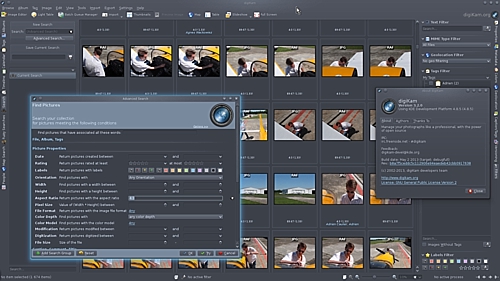
10. Digikam – heard of this one before? This is another free RAW processing editing package which is open source. This software can handle large libraries. This is available only for Windows and Linux and has some advanced editing tools. Images can be exported in many formats.

Screenshot of Digikam – Image by Digikam
11. Photopad – this freeware is available for just personal and non-commercial purposes. It lets you edit RAW and BMP images and supports most of the image formats. This software is packed with some amazing features great for beginners and apart from basic adjustments, includes, sharpening, noise reduction, merging to create HDR, working with layers and non-destructive editing.

Photopad – Image by Photopad
12. Photo Filtre 7 – is a complete image retouching software that allows the user to make advanced processing to an image and has various filters that can be applied to the image. This software is very easy to use and has a layer manager with advanced brushes, modules, and others.
While Photofiltre 7 is free, it has some limitations compared with its commercial or professional Studio version which is delivered as shareware, PhotoFiltre Studio X.

Photo Filtre – Image by Photofiltre
13. Fotor – A RAW image processing software available free for Mac and Windows and supports importing and exporting various file formats. There are some good tools that include color correction, basic adjustments, image manipulation, and transformation. You can also view the complete EXIF data of images.
Fotor also has a web-based app with some basic adjustments, fine tune adjustments, white balance settings, curves and resizing options. There are many effects available, with many of them being paid, which is a bit of a disappointment.

Screenshot of Fotor
14. Paint.NET – This software provides an innovative user interface that supports layers, special effects and other powerful tools like transform, color and level adjustments, adding text, etc. Even though it is powerful, it is very easy to use, but sadly can be used only on Windows.
With the help of the RawLoader plugin, you can open and edit RAW files in this app. There are also many other plugins that make this software very versatile.

Paint.Net – Image by Lewys
15. Chasys Draw IES – A good image processing software that supports RAW formats and includes a layer based editor. There are many amazing tools built into this free software that lets the user fine-tune their images. It also supports various other file formats but is available free only for Windows.

Chasys Draw IES – Image by John Paul Chacha
Web-based editors: If you want to quickly enhance your images, without having to install any software on your computer, there are some interesting web-based apps available. It should be noted that they do rely on a reasonable internet connection
16. Polarr – This software can be used online via any up to date browser or downloaded. The app is built with some rich features that include adjusting white balance, HSL, curves, lens distortion, details, and others. It runs on all operating systems including the ones for desktop and mobile.
However there is a pro version that is paid, and features like radial, gradient, color, brush masks, Denoise tools, some filters, etc are available only in the paid version.

Screenshot of Polarr
17. Photoshop Express – This is a free editor that is very easy to use and is available free on the Windows store and for mobile devices. It has a simple interface with most of the important tools built in. You can edit raw files and comes with features like auto-fix, creative effects, collage creation with borders, layouts, and backgrounds, stickers, tattoos, and text styles.
Photoshop Express also comes with unique lenses and effects to make works easy when editing photos. Other important features include Transfer styles, spot healing, sharing to social media.

Image via Adobe
18. Pixlr X – A photo editor with a family of photo editing apps like Pixlr Express, Pixlr Editor, Pixlr-O-Matic, Pixlr Pro which are web apps that allow for some basic editing and lets you fine-tune images, though not for professional use. However there are tools such as liquify and retouch and this web-based editor supports JPEGs and not RAW, does not require registration and is also available for mobile.

Screenshot of Pixlr X
19. Sumopaint – this simple photo editing software has a layout similar to Photoshop and one that is easy to use. With its many built-in features, Sumo paint can be used to create some beautiful images and anyone who does not wish to spend money on paid software can make the best use of this. This software can be either downloaded or used in a browser

Screenshot of Sumopaint
20. Ipiccy – a basic web-based editor that lets you quickly make some basic enhancements to images. If you do not want to get into the complexity of using layers and other sophisticated tools while editing, this one is definitely simple and worth trying. It has most of the basic adjustments including curves, HSL, clone, dodge, etc.

Screenshot of ipiccy
Basic Editors: If you are a newbie to photography and/or editing, and want to get to grips with the basics of editing, the following software packages will help you get started. While many of these editing tools work on any operating systems, there are a few noted here that are built solely for Windows.
21. Faststone Image Viewer – This is a simple, feature-filled image viewer and editor that lets you view, manage and edit images using its editing tools including resizing, rotate, crop, sharpen, lighting, colors, curves, levels, etc. It also has features like clone stamp, healing brush, and red-eye removal.
Although this is a straightforward offering, it does support RAW files of almost all types and opens and exports images in various formats.

Fastone Image Viewer – Image by Faststone
22. Photoscape or Photoscape X – This is a fun photo editor that lets you quickly enhance your photos by making some very basic adjustments like white balance, brightness, colors, red-eye removal, etc. Batch editing, resizing, photo merge, collage, splitter, animated GIFs, are some more of the features offered by this software.
There are some cool overlays, textures, dirt and scratches and frames for those who are looking to create scrapbook photos and surprisingly, this software supports RAW. Windows 10 and Mac users will have to use Photoscape X

Photoscape – Image by Photoscape
23. Pinta – this is an open source program that can run on Mac, Windows, and Linux. With a very simple to use interface, this software has some basic editing tools, lets users work with layers and has a history that lets you undo unwanted changes made to your images.

Pinta – Image by Pinta
24. JPEGView – a light open source software package for image editing, that runs only on Windows. It has a very simple GUI and allows basic processing of images in various formats like JPEG, BMP, PNG, GIF, TIFF.

JPEGView – Image by JPEGView
25. Seashore – this is an open source image editor developed only for Mac. It is based on GIMP’s technology and some of its features include gradients, textures, and layers. The user interface is unique and it is an app for users looking to do basic image editing.

Seashore – Image by Seashore
26. Photo Pos Pro – this software is packed with some premium editing features and performs simple to complex tasks. It supports RAW files and many other types of file formats. Some of its powerful functions include selection tools, layers, and masks, gradients, batch operations, etc. and it has a user-friendly interface.
The drawback, it only runs on Windows.

Photo Pos Pro – Image by Photopos
27. Image Analyzer – image editing software with some advanced features that are not available in most advanced free software. It features basic adjustments, adaptive filters for noise reduction, retouch tools, supports layers and supports various file formats. This software is available only for Windows and does not support RAW.

Image Analyzer – Image by Image Analyzer
28. Visions – this is another image viewer/editor, solely built for Windows. It comes with some basic enhancement tools and is very easy to use. It also has a unique interface, unlike some software packages that emulate Photoshop.

Visions – Image by Visions
29. PixBuilder Studio – this is another free Windows only software package that works for both beginners and professionals. It allows for some basic adjustments to professional editing that involves layers, curves, gradients, masks, sharpen, transform, clone stamp, healing brush, etc. Unfortunately, it does not support RAW files.

PixBuilder Studio – Image by Pixbuilder
30. IrfanView – software most of us would have used in the good old days when digital cameras were just entering the market. This app is one of the first Windows graphics viewers that is compact and has some interesting features. It is a good app for beginners to start with, with most of the basic adjustments, basic enhancements and while it is a Windows only app, it does support numerous file formats.

IrfanView – Image by Irfan Skiljan
Next is a list of very basic tools, with a combination of both standalone and browser-based apps. These can come in handy to quickly make the most basic modifications like exposure, contrasts, saturation, crop, etc. Some of these editing suites let you adjust white balance, work with curves and even have adjustment layers + nondestructive editing.
This list consists of web-based and standalone apps. And, there are some paint/illustration programs included here that are also capable of some basic image processing.
31. Shotwell – this is a photo manager for Linux users that helps the user organize photos, apply tags/keywords, and do some basic adjustments like crop, rotate, enhance photos, color correction, etc. Although simple, it supports RAW formats which is a huge positive for photographers.

Shotwell – Image by Softpedia
32. F-Spot – another simple app for the Linux desktop, this software helps you to organize images and do some basic enhancements like crop, brightness, contrast, color adjustments, temperature, tagging, etc. It supports RAW and a few other file formats and lets the user view and export EXIF details. Not sure if there is still support from the developers, as the latest version is from December 2010.

F-Spot – Image by F-Spot
33. Hornil StylePix – an image editor for Windows, which is light and has features like enhance and restore, and tools like, text tool, selection tool, batch processing, supports layers, filters and has the transform tool. It also has a paid pro version that offers some more advanced functionality.

Hornil StylePix – Image by Hornil StylePix
34. InPixio Free Photo Editor – this photo editor can help produce professional looking photos and lets you add a lot of effects quickly and easily. You can also choose from a number of designs and frames if you are looking to showcase a particular theme in your photos.
You can make all the basic adjustments like cropping, brightness & contrast adjustments, change colours, tones, make dull and boring photos pop, use fonts for which opacity can be adjusted, etc. You can also apply creative effects or filters and frames that include vintage looks black and white, cinematic and more to your photos and share the images to social media from within the editor.
Photos taken in extreme sunshine or on an overcast day can lose their intended appeal and end up not being suitable to share with others. The photo editor can easily turn photos that look dull or overly bright into images that ‘pop’ by allowing you to change the colour, brightness and tone of your pictures.

Inpixio – Image by inpixio.com
35. LazPaint – a free open source image editor that runs on all platforms. It has most of the basic tools required to enhance an image along with some filters. This software can operate alongside GIMP and can read/write various file formats.

LazPaint – Image by Circular
36. Pixeluvo – a photo editor for Windows and Linux desktop with a modern UI, that supports layer-based image editing. It lets the user make basic editing and some complex image manipulations. An advantage is that it supports RAW formats for many cameras. While this software is free, some features are available only for paid premium users.

Pixeluvo – Image by Pixeluvo
37. ImageJ – an open source image editor written in Java that runs on all platforms. It supports many file formats, unfortunately not RAW, and has various tools like selection tools, enhancement tools, and some color adjustments.

ImageJ Window – Image by ImageJ
38. PixBuilder Studio – this software is free and runs on Windows only. You can do some decent editing and manipulate images using color adjustments, layers, gradients, masks and with tools like transform, healing brush and clone stamp. It supports a few image formats like JPEG, GIF, PNG, etc.

PixBuilder Studio – Image by PixBuilder Studio
39. Fotografix – a very light and free image editor for Windows, it has some basic features like exposure and color adjustments, crop, clone, selection tools, working with layers and supports many file formats including PSD and GIMP files. It also comes with some useful tools like magic wand, eyedropper, gradient tool, and it lets the user sharpen, and adjust shadows/highlights.

Fotografix – Image by Fotografix
40. PhoXo – another very small open source image editor, that is designed to run on Windows. It is packed with features that include using layers, special effects, batch processing, selection and retouching/enhancement tools and various text effects.

PhoXo – Image by PhoXo
41. PixelStyle – a photo editor for Mac that provides all the basic and essential tools for image processing. Some of the features include filters like blur, distortion, tilt-shift, adjustment tools like exposure, white balance, shadows/highlights, brightness/contrast, clarity, etc., tools for retouching, noise reduction, working with adjustment layers and the most important of all, it supports RAW processing.

PixelStyle – Image by PixelStyle
42. PhotoDemon – a free, open source and portable image editor for Windows, that allows batch processing. It has most of the essential tools required for post processing like curves, brightness/contrast adjustment, color balance, white balance, various special effects, HSL, vibrance, transform and more. It also supports various file formats, including most RAW formats too!

PhotoDemon – Image by PhotoDemon
43. ShowFoto – An open source, cross-platform, image editor that is part of the DigiKam project mentioned earlier. This software lets you manage, edit, enhance, organize, tag and share photographs. Most of the essential tools like color adjustments, tagging, rating, white balance, lens corrections are incorporated into this.

ShowFoto – Image by KDE UserBase Wiki
44. Image Enhancer – a free image editor developed for Windows user. Its main features include filters, working with multiple layers and it supports various file formats. It should be noted that there haven't been any updates from the developer since 2014.

Image Enhancer – Image by Image Enhancer
45. Pixelitor – a free, open source image editor that supports layers, layer masks, gradients, blending modes, lets the user make color adjustments and is packed with lots of filters. While this app only allows saving the layer structure in a format that can only be opened in Pixelitor and not others, it does let you save the final image in the common formats.

Pixelitor – Image by Pixelitor
46. SharpShot – a multi-platform picture editing app, that is very simple to use, unlike say GIMP or Photoshop. It has some good features like batch processing, basic adjustment tools, metadata browser and some helpful features like sharpening and noise reduction.

SharpShot – Image by AlternativeTo
47. Chocoflop – software for Mac users, that allows for nondestructive editing. This small but fast software supports layers and has several filters and editing + enhancement tools. Unfortunately, the development part of this software has been discontinued, with no further updates and runs on OS X Leopard (version 10.5).

Chocoflop – Image by Chocoflop
48. CodedColor PhotoStudio – software for Windows only, this app has a pro and basic version. You have a 30 days trial period to try the pro version and then decide on whether to stick to the basic version – which is free – or buy the pro version. This software lets you edit images, make color adjustments, batch process, correct perspective, adjust white balance, organize images and supports RAW formats.

CodedColor PhotoStudio – Image by CodedColor PhotoStudio
49. LiveQuartz – free software for Mac users that makes layer management a breeze via nondestructive editing. It is also loaded with a lot of dynamic filters and has all of its user interface in one window.

LiveQuartz – Image by LiveQuartz
50. ImageForge – straightforward software available for Windows, this app has a set of powerful tools for editing images, applying filters and lets you create slideshows. The standard version is free, whereas the Pro version, which has some advanced editing tools, is paid.

ImageForge – Image by ImageForge
51. ShiftN – Windows software for correcting perspectives or, in other words, used to analyze images and correct converging lines. Although this software may not do much in terms of image editing, it can be helpful for architectural photographers.

ShiftN – Image by ShiftN
52. PT Photo Editor – Windows-based software that lets you improve, correct, repair and retouch images, quickly remove red-eye, remove blemishes, provides clone and heal brushes and also allows for smart selective editing. It also comes loaded with some customisable presets. While the basic version is free, if you are looking for some professional tools, you’ll have to buy a pro version.

PT Photo Editor – Image by Softonic
53. Ashampoo Photo Commander – software developed to run on Windows that lets the user manage, organize and auto adjust images. It has some basic editing features along with noise removal, some special effects and supports numerous file formats.

Ashampoo Photo Commander – Image by Ashampoo
54. Magix Photo Designer – this Windows app is designed for making some basic corrections to an image. Some of the features include selective lightening, removing objects, panorama, red-eye removal, etc. It also has a set of selection tools, blend tools, and a distortion tool. For the fun part, it lets you create photo caricatures and has some artistic filters too.

Magix Photo Designer – Image by Magix
55. VirtualStudio -this Windows-based software has some good features that can also run a few plugins and comes with VirtualPhotographer. It runs many of Photoshop's plugins, supports layers and blend modes, lets you make image adjustments, including white balance and sharpening, has the curves functionality, histograms, and supports around 30 file formats including some RAW files.

VirtualStudio – Image by Virtual Studio
56. Scarab Darkroom – a RAW file converter for Windows, this software lets the user make some basic adjustments to the image. The free version, however, lacks noise filtering, has fewer color controls and does not support many new camera models. The full version is available to buy.

Scarab Darkroom – Image by Scarab Labs
57. Imagia – photo editing software for Windows, with a lot of features for creating a beautiful image. This lets the user make some basic adjustments, apply filters and has features almost similar to Lightroom. While the “Lite” version is free, the “Pro” version is available for a price.

Screenshot of Imagia – Image by Imagia
58. Photo! Editor – this is quite a powerful software package for Windows and has a good set of image editing tools. It lets you make color adjustments, make caricatures, add lights and has one of the best denoise tools. If you want to use this editor online, there is an online version too Pho.To that was mentioned before!

Photo! Editor – Image by Photo! Editor
59. PC Image Editor – free image software for Windows that is fast and has tools to make basic adjustments required on an image. It also comes with some filters and effects that can be applied to images. A very simple piece of software, that supports only limited formats.

PC Image Editor – Image by PC Image Editor
60. Free Picture Resizer – this Windows software, although it carries the name “Resizer” also lets the user make some basic adjustments to their images, batch processing, color correction and it has some filters.

Picture Resizer – Image by Free Picture Resizer
61. Image Tricks Lite – Mac software that features the ability to apply filters to photos, add frames, mask pictures, etc. It also lets the user make basic adjustments to images. A quick and handy tool when your images require a little tweak.

Image Tricks Lite – Image by Softonic
62. XnView – Windows freeware for personal and educational use that lets the user process their images using tools like crop/rotate, brightness/contrast, levels, modify color depth and apply filters and effects. This is also an image viewer and lets you create slideshows.

XnView – Image by XnView
63. Zoner Photo Studio – this Windows software has some basic editing tools that let you make some quick edits, enhancements and color adjustments in the basic version that is free. However, for some advanced editing, you will have to buy the paid version.

Zoner Photo Studio – Image by Zoner Photo Studio
64. Preview – the Preview app that comes with Mac is not just for previewing images, but lets you also make some basic edits to your images. It also comes with some selection tools, shape tools, text tools and color adjustments.

Screenshot of Preview App
Some Paint / Illustrator programs that aid in some basic editing of images:
65. Krita – although a tool for painting and illustrations, Krita, an open source and cross-platform app, lets users edit images with the help of its layer management, selection tools, layer masks to work nondestructively, transform tools and color management. It also comes with a bunch of filters and supports HDR.

Krita – Image by Krita
66. Ultimate Paint – a Windows graphics/paint program that lets users manipulate images. The software has some built-in tools and filters that allow for some basic image processing. The standard freeware version does not support plugins, while the paid version supports Adobe plugins.

Ultimate Paint – Image by Ultimate Paint
67. Cinepaint – open source paint software that comes with image editing tools; works on Linux and Mac. Key features include 32-bit image editing, retouching and supports most of the common file formats.

CinePaint – Image by CinePaint
68. GrafX2 – a free image editing tool for all platforms. This software offers some image editing features using brushes, palette editor, and some effects.

GrafX2 – Image by GrafX2
For HDR:
69. Picturenaut – simple and efficient software that has features like exposure detection, image alignment and ghost removal to create beautiful HDR images. It supports RAW and PNG files. Unfortunately, it is available only for Windows with the Mac version under development.

Picturenaut – Image by Picturenaut
70. Fhotoroom HDR – Windows only software that lets you process RAW images, by fixing exposure, color, and any distortions and allows the use of custom presets. It has an HDR workflow that has powerful image alignment, ghost removal, and tone mapping features to allow the user to create some dramatic HDRs.

Fhotoroom HDR – Image by Fhotoroom HDR
For Panorama:
71. Microsoft Image Composite Editor – An app by Microsoft that can stitch images to create high-resolution panoramas. This software also lets users create panoramas from panning videos, supports reading RAW files and exporting to a variety of image formats. It can also add missing pixels around the edges of panoramas thereby enabling complete images.

Microsoft Image Composite Editor – Image by Softonic
72. XnRetro – freeware for Windows that has some filters with retro effects, some lighting effects, and borders. One can make basic adjustments like contrast, gamma, saturation, vignette and noise reduction.

XnRetro – Image by XnRetro
73. ON1 Effects – can be used as a standalone app or as a plugin for Lightroom and Photoshop. Runs on Mac and Windows with many stackable filters, textures, and borders. Adjustment brushes, gradients, etc. and other tools are available to make adjustments to images.

ON1 Effects – Image by ON1 Effects
Online or Web-based Apps:
74. Canva – This a web-based app, also available for iOS, helps the user quickly create designs for banners, infographics, postcards, etc. You can create your own design or select one of the many available templates to start with.
Canva which is mostly aimed at users who need to design stuff for sharing on social media also comes with a simple photo editor that lets you quickly make some basic adjustments like brightness, contrast, saturation, vignette, etc. so that you can quickly edit and share.

Screenshot of Canva
75. PicMonkey – this is an online photo editor and design maker that has some editing tools like crop/rotate, exposure, colors, sharpen and touch up tools like blemish fix, teeth whitening, brighten eyes, etc., filters, text tools, etc. Only some features are free, while the rest are available for paid premium users.

Screenshot of PicMonkey
76. Photopea – an online photo editor that is totally free to use. It supports PSD files that can be exported as JPEG, PNG or GIF. Some of the features are crop / resize, brushes, supports layers, selection tools, adjustments, filters, etc.

Screenshot of Photopea
77. Photo Raster – this is a free online photo editor that supports working with different layers, use adjustments for brightness/contrast, shadows/highlights, HSL, temperature, curves, vibrance, etc. and also has other features like, filters, masks, selection tools, transform, etc. Users can make some decent edits on images using this software.

Screenshot of Photo Raster
78. PaintStar – free image processing software that lets the user retouch photographs, has customisable brushes, textures, and gradients, is enriched with tools like sharpening/blur, transform, gradients, selection tools and supports more than 30 file formats. It also lets the user work with layers, displays EXIF info and has more than 100 filters and effects. Runs only on Windows.

PaintStar – Image by Paint Star
79. Pizap – a free online photo editor that has some basic adjustments like brightness, contrast, temperature, saturation, noise, soften, hue, etc. However, there are some special effects filters, that are available only in the pro version, which requires payment. You can still use the app for basic adjustments.

Pizap – Image by Pizap
80. Picozu – an online image editor that lets you edit images using filters, layers and has some editing tools like magic eraser, freehand selection, cropping, etc. It supports PSD files, has image retouching functions, and your final image can be saved in various formats.

Screenshot of Picozu
81. Ribbet – a fun and easy online photo editor with features similar to picnik. Images can be fine-tuned using the tools incorporated and via the special effects it comes with.

Screenshot of Ribbet
82. Stet.io – an online free image editor with all the basic tools included like clone, red-eye removal, curves, brightness/contrast, clarity, HSL, noise reduction, temperature and supports working with layers.

Screenshot of Stet.io
83. Pho.to – this is an online editor for users who like to have fun effects on their images. Apart from the image fixing and enhancing tools, this editor has some cool features like one-click portrait retouch, photo frames, collages and filters to play around with.

Screenshot of Pho.to
84. Phixr – A basic online photo editor that can be used to make some basic adjustments to images like temperature, vibrance, saturation, brightness/contrast, shadows/highlights, sharpen, noise removal. Besides these, it has some special effects for a fun look and also has a text tool.

Screenshot of Phixr
85. Photocat – An online photo editor, image retoucher and collage creator, this app lets users make use of the available effects, make some basic image adjustments, use text tools, frames, retouching and has some templates for collage.

Screenshot of Photocat
86. BeFunky – a free online photo editor with some essential tools to make basic adjustments and enhance the images. However, some of the features are available only in the “plus” version which is available for a subscription fee.

Screenshot of BeFunky
87. Splashup – an online photo editor that is versatile and lets the user make some basic adjustments to their images, has some standard tools for editing, allows working with layers and has some useful filters.

Screenshot of SplashUp
88. Picfull – if you want to quickly apply a filter and share your photos with friends or family, this is a very basic online image editor, that lets you apply customisable filters and that’s it. It’s a filter only app, no editing

Screenshot of PicFull
89. Fun Photo Box – an online photo editor with most of the basic adjustments, text tools, red-eye and blemish removal, effects, frames, etc. Can be used for a quick touch-up, but not for serious editing needs.

Screenshot of Fun Photo Box
90. FotoFlexer – a web-based image editor which supports basic edits, has some effects. Working on full screen, and clicking on each tab gives the user access to individual edits available under each option.

Screenshot of FotoFlexer
91. Free Online Photo Editor – A free web-based image editor that lets the user do some basic enhancement to their photos and provides a set of filters and effects.

Screenshot of Free Online Photo Editor
92. LunaPic – an online photo editor that has quite a few processing tools, filters, effects, borders and animation tools. Something that would help with a quick edit and share.

Screenshot of LunaPic
93. CutMyPic – an online image editor with very basic options to edit images like adjusting brightness, contrast, sharpen, de-noise, some filters, and special effects. It can be used just for exposure adjustments and nothing much more.

Screenshot of CutMyPic
Here is a software that every photographer should use. It will help you plan your visit to a particular place to get shots in good weather and lighting conditions.
94. Photographer’s ephemeris – Well, the last free software here on our list is not about image processing, but something that helps a photographer to be in the right place at the right time, when the lighting conditions are just right. It gives the sunrise/sunset and moonrise/moonset times + the weather details for a particular location, thereby aiding photographers to make the best use of natural light for landscapes and cityscapes because it shows exactly how light will fall on the land for any location on earth.
The Photographer’s ephemeris is free for desktop and paid for mobile.

Screenshot of Photographer’s ephemeris
If you are into Astrophotography and star photography, here are some amazing softwares that you will find to be helpful. Some of these are so easy to use and produce outputs quite quickly that we would image.
95. DeepSkyStacker – this is a free software for astrophotographers that simplifies all the pre-processing steps for deep sky pictures. The software does the registering, stacking and a quick post stacking process for previewing your final image.
Some of the main features of DeepSkyStacker are, automatic registration of a set of pictures, automatic detection of stars, preview of registered stars, sub pixel registration, sub pixel alignment and stacking, simple post-processing with RGB levels, luminance curve and saturation adjustments.
Furthermore some advanced features are automatic determination of darks, flats and offsets to be applied to the pictures using ISO speed and exposure time, automatically detect and remove hot pixels and bad columns during the stacking process, options to detect and clean hot and cold pixels remaining after calibration, automatic dark optimisation, feature to batch multiple stacks and a lot more!

Screenshot of DeepSkyStacker App via DeepSkyStacker
96. Planetary Imaging Pre-Processor (PIPP) – this is an application for Windows that is designed for pre-processing planetary images before stacking them with any image stacking softwares. PIPP crops each image and selects the best frames so one can improve storage space and processing times of the stacking software.
Some of the features of PIPP are to calibrate frames with dark, flat and dark flat calibration frames, check each frame contains a planet that is completely on the image and discard any frames that do not, check and discard overexposed frames, centre the planet in the frames, offset the centred planet, apply a fixed gain, fixed gamma correct, median noise filter to each frame, stretch histogram for each frame and so on.

Screenshot from PIPP
97. CCDStack – this program provides you with tools to process, assemble and view the astronomical images you photographed. It uses sophisticated concepts and methods for stacking processes.
Some of the features of CCDStack are, dark, flat and bias frame calibration, star bloom removal, image alignment and registration, re-sampling of registered images, image normalization, image combine, gradient removal, real-time DDP display, deconvolution and sharpening, open selected files automatically, select and load files based on user defined attributes and so on.

Screenshot via CCDWare
98. Regim – this is a program for processing astronomical images that can be used along with advanced post processing softwares like Adobe Photoshop. This software helps with making some processing steps that are unique to astronomical images a bit easier. Some of these features are calibration (both dark and flat), deblooming, registration, combination, colour calibration, gradient removal, etc.

Screenshot via Regim
99. StarStaX – this is a very versatile program for image stacking and blending that facilitates stacking a series of photos into a single image. There are options to use different blending modes just like we would in most advanced programs that support layers and blending options. This is a very useful tool for users looking to create star trail photographs and it can also be used for various other types of photography like light painting.
One advanced feature of StarStaX is its interactive gap-filling that can help create an image sequence of the blending process that can then be easily be converted into time-lapse videos. Starstax is free to use and is available for Mac and Windows.

Screenshot by StarStax
Last, but by no means least, is a software that every astrophotography enthusiast should use to learn what is in the sky at a particular time and location. It will help you get to know the constellations, locate planets etc., any time of the year.
100. Stellarium – this is a free open source planetarium for your computer and it shows the sky in realistic 3D just like you would see with a telescope. Some of the features of Stellarium are, default catalogue of over 600,000 stars, extra catalogues with more than 177 million stars, default catalogue of over 80,000 deep-sky objects, extra catalogue with more than 1 million deep-sky objects, asterisms and illustrations of the constellations, images of nebulae, realistic Milky Way, realistic atmosphere, sunrise and sunset, planets and their satellites.
The Stellarium interface has a powerful zoom, time control, fisheye projection for planetarium domes, graphical interface, telescope control, etc. Some of the visual effects and simulations include, equatorial and azimuthal grids, star twinkling, shooting stars, tails of comets, iridium flares simulation, eclipse simulation, supernovae and novae simulation, etc.

Screenshot by Stellarium
Are there any pieces of software that you know of, or you use that you think should have made to this list? Let us know about the apps you use in the comments below and why you think it is worth giving a try.




18 Comments
Nik Collection is not here. It works well even through a simple software like Fastone.
Wow, this is quite a list. Sometimes paying a small amount to access these tools is worth the money however to get access to all features. I find that nowadays most tools are quite affordable even for amateur photographers.
Great list though and thanks. I will definitely look into a few of these.
Hi Katie, Thank you for going through. I agree it is worth paying the money for a full featured software 🙂
Darktable is available on Linux as well. I’m all Linux and it’s an indispensable part of my workflow!
I keep everything Cataloged in Darktable and do most of my tweaks there. I reserve the GIMP for more intensive retouching work, like intensive spot removal or burn/dodge type stuff.
I also print from GIMP as Darktable’s printing system is over simplified making it impossible to get the results you’re looking for.
Hi Jason, thank you for that. We will get the information updated 🙂
Nice list but I think you should include PhotoViewerPro. I am using this software and I think it’s perfect. Highly recommended.
Hi Rsisabella, thank you for the suggestion. Will look into that 🙂
It’s also good when it comes to sharpening/blurring photos. As well as adjusting the lightning.
GIMP is not also known as “GNU image manipulation program”. They are one in the same, the former being an acronym of the latter. Further, GIMP was not created as an equivalent to Photoshop. Two Berkely students embarked upon its creation as a course project. You state that GIMP is not as versatile as “premium photo editing software.” Yet, you mention not one feature where it is lacking. I challenge you to cite one significant feature where GIMP lacks comparative versatility.
You state “It should be noted that there is a learning curve to mastering GIMP”. This is a common critique leveled by users of PS users and users of software more purposely designed to be “eqivalent” to Photoshop that results from their indoctrination to the PS interface. To be fair, one has to concede that there is, most certainly, a learning curve to Photoshop (and other “premium photo editing software”) which is equally steep to that of GIMP.
With regard to darktable, it is not at all similar to Photoshop. It is similar to Lightroom in that the two applications can be used as RAW file converters. It always amazes me that reviewers of darktable tend to gloss over its most distinctive features. This applicaton includes many manipulation modules, most all of which can be applied globally, or, through the use of its elegant masking abilities, locally to specific areas of the image. Photoshop and/or GIMP can make localized adjustments, but only after the image has been converted from its RAW state. darktable performs these adjustments while the image is in its RAW state. Additionally, any of these modules may be applied in multiple instances. IMO, darktable is the most powerful RAW editor/converter available today.
I do compliment you on the extensiveness of your list.
Respectfully,
John
Some of my favorite programs include Chasys Draw IES, as well as Starstax. They are in some ways superior to Photoshop, even though Photoshop has more benefits than all of these software combined. I’ve had trouble loading Darktable, but hope to try soon. Zoner Photo Studio, at least the paid version, is, according to what I’ve read, a very nice program and alternative to PS. However, even though free programs might be nice, I also like to buy something that has much of what many free programs have, combined into the same package.
Thank you very much , credit to you that is a huge list and with the work to put it all together so well , many thanks Dahlia i found DeepSkyStacker i will have a look at ;).
Thank you Patrick. Glad it was helpful and would love to see what you create with the Deepskystacker program 🙂
Thanks for this extensive list. I’ve tried a number of theses over the years as I improved my skills and I can say that they are all really good. I can also say that with some of them there is a learning curve as you don’t necessarily use the adobe styled ecosystem to work which sometimes is a good thing. I use Zoner Photo Studio as well as Darktable and Rawtherapee even though I do own proprietary software like On1 and Corel Paintshop Pro. I do however spend my time between Linux and Windows ecosystems and I found that for my workflow continuity it was just better to learn those two pieces of software as well as Gimp as it made switching and working so much easier. The things about your list I find is that there is something for everyone regardless of skill level. The other thing is once you’ve found something that fits into your workflow and fits your style then by all means take the time to master it. At then end of the day it’s all about you the artist and your vision.
I love Pixlr X because it is simple and easy to use. The interface of this software is user-friendly. So, anyone can edit photos using it without having any skills.
Looking for some guidance on setting up a workflow using the open source photo tools. So many tools, so little time to learn them well. What is the min. list of tools to: download photos from cameras (4 of them), organize the photos, process RAW, edit them (I so use GIMP for major edits), export in a variety of formats? Specialty software like Hugin?
Thanks,
Dave
wow what a list….but not finding the info within the listings of what I need…..looking for software for editing lensball photography….needs to be capable of selecting round ball within the image and rotating the round image. Also capable of reading RAW, JPEG and DNG files…..this is for a Windows computer. Can anyone help me determine which software on this list can do this. thank you
Hi Bonnie, I am assuming GIMP will be helpful with selecting and rotating the round image, plus capable of reading RAW, JPEG and DNG files 🙂
This article was very informative.
I use both Gimp and Photoshop. But for less complex editor I usually use PaintNET it’s free and open source too. Give it a try.
I have a XPPen Deco Fun drawing tablet, Using a pen so much more intuitive than using a mouse. I feel like using a mouse to edit is like trying to use a brick to draw instead of a pencil.